Loro Piana Knitwear: Build Your Catalog Shortlist
- Published
- Revised
- Editors
- Marcus Hale · Editor-in-Chief
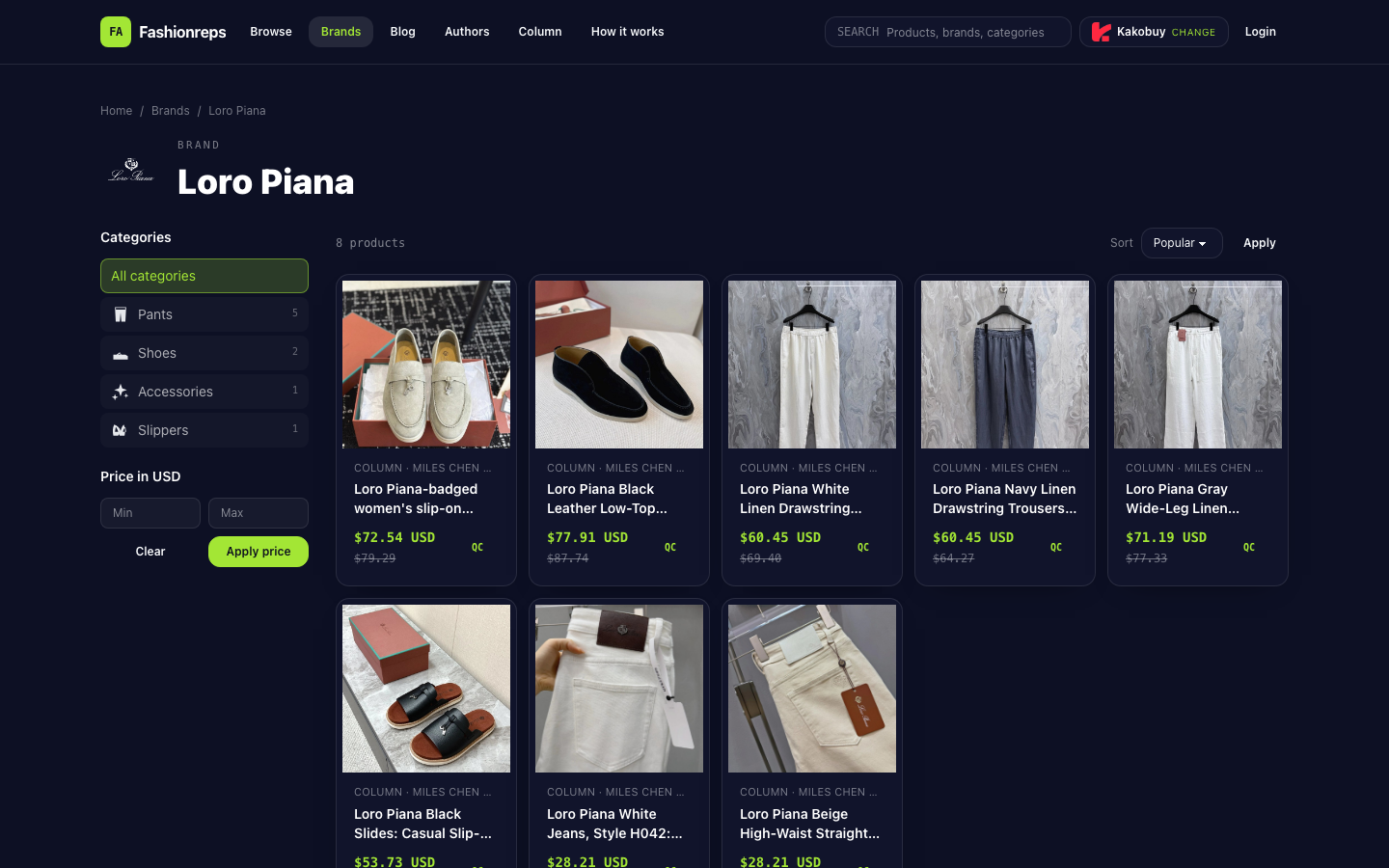
First, confirm whether the catalog actually has knitwear If the goal is to build a Loro Piana knitwear candidate list, the first step is not to copy product information, but to check the product categories currently displayed in the brand catalog. The Loro Piana page on Fashionreps currently shows 8 items, categorized as pants, shoes, accessories, and slippers, with no knitwear ca
Editor score 4.2 / 5
First, confirm whether the catalog actually has knitwear
If the goal is to build a Loro Piana knitwear candidate list, the first step is not to copy product information, but to check the product categories currently displayed in the brand catalog. The Loro Piana page on Fashionreps currently shows 8 items, categorized as pants, shoes, accessories, and slippers, with no knitwear category or knitwear product cards displayed. Therefore, at this stage, you cannot confirm the existence of filterable knitwear candidates based solely on the brand catalog.

This means that for this check, you should first record "no knitwear found" instead of mistakenly filling other categories into the knitwear table. Visible products on the page include women's loafers, black leather low-top shoes, linen drawstring pants, navy blue linen pants with embroidery, gray wide-leg linen pants, black slippers, white jeans, and beige high-waisted casual pants. They cannot substitute for knitwear candidates.
Complete the first round of verification in the product catalog
After opening the Loro Piana brand catalog, you can check in the following order:
- Look at the total number of products displayed on the page and the category filters.
- First check whether any knitwear description such as Knitwear, Sweater, Cardigan, Pullover, or similar appears.
- Check the title of each product card one by one to confirm that the product name, category, and color are consistent.
- Only when a product truly belongs to knitwear, continue to record the size, specification fields, product link, and QC entry.
- If the page still shows only pants, shoes, accessories, and slippers, mark this round's result as "no knitwear candidates" and stop specific recommendations.
The current page provides category filters, price range filters, sorting, and QC entries in the product cards. The prices shown on the page are reference prices; for example, the listed products' reference prices range from $28.21 to $77.91, but these prices belong to other currently visible categories and cannot be inferred as knitwear prices. The page also does not provide verifiable color, size, or stock information for knitwear.
Rules for recording colors, sizes, and links
When knitwear products appear in the catalog in the future, each candidate should occupy a separate row and be recorded according to evidence status, rather than filling in missing information based on product titles.
| Field | Recording method | Handling when insufficient |
|---|---|---|
| Product title | Copy the product card title as is | Do not rewrite it as a knitwear name on your own |
| Color | Record only the color explicitly stated on the page | If not shown, fill in "Not provided" |
| Size | Record the size explicitly listed on the page or product details | Do not speculate using common size ranges |
| Specification fields | Keep displayed information such as material, fit, or style | Leave missing fields blank and note for recheck |
| Product link | Enter from the corresponding product card and verify the redirect result | Pause recommendation if redirect is abnormal |
| QC entry | Record whether a corresponding QC entry exists | Do not use brand pages or other product QCs as evidence |
| Review notes | State whether the image, title, size, and link are consistent | Mark as stop condition if there is a conflict |
Images only prove the product or page state they correspond to, and cannot automatically prove size, stock, or material. If a product image looks like knitwear but the title or specification fields do not support this judgment, keep the doubt and wait for the product detail page or other corresponding evidence.
Browse with the website catalog, then organize with Google Sheets
The website catalog is suitable for discovery and verification: narrow down by using the brand page's category and price filters, open product cards to confirm titles, and then enter corresponding links to check QC entries. Its advantage is that products, images, and entries are in the same browsing flow, but whether the current page can provide knitwear information must still be based on the actual displayed content.
Google Sheets is suitable for the second stage of organization. You can create columns such as "Category", "Color", "Size", "Specification completeness", "Link status", "QC status", and "Review notes", and then use filters to view only rows with category knitwear, complete size evidence, and verified links. For the current catalog, the sheet can also keep a stage record: brand page checked, currently shows 8 items, no knitwear category found, no purchase candidates generated for now.
The division of labor between the two should remain clear: the website is responsible for providing the current catalog and product entries, and Google Sheets is responsible for organizing verified information into a filterable and reviewable list. Blanks in the sheet cannot be treated as the website not having that information, nor can manual judgments be written as verified facts.
Three situations where you must stop
If any of the following situations occurs, you should not list the product as a purchasable knitwear candidate:
- The page has no knitwear products, only other categories.
- The image appears to correspond to knitwear, but the title, specification, or link points to other products.
- The product has a title and image, but there is insufficient size evidence, or the link cannot confirm the corresponding product.
In these situations, the most prudent result is to keep review notes and wait for new knitwear entries to appear in the catalog or obtain corresponding product detail evidence. The current Loro Piana brand page can only support the conclusion "catalog checked but no knitwear candidates found" and cannot be used to recommend specific colors, sizes, or purchase links.
Community feedback 0 reviews
No approved reviews yet.