How to Verify Prada Coupon Eligibility on fashionreps
- Published
- Revised
- Editors
- Marcus Hale · Editor-in-Chief
Bottom line: The currently verifiable Prada page materials only show brand products, categories, reference prices, shopping platform options, and purchase entry points. They do not provide confirmable current official coupon codes, discount percentages, minimum spend, validity periods, or brand exclusion rules. Therefore, you cannot determine from the Prada product page alone that a discount will definitely apply, nor can you promise how much you will ultimately save. A safer approach is to reco
Editor score 4.2 / 5
Bottom line: The currently verifiable Prada page materials only show brand products, categories, reference prices, shopping platform options, and purchase entry points. They do not provide confirmable current official coupon codes, discount percentages, minimum spend, validity periods, or brand exclusion rules. Therefore, you cannot determine from the Prada product page alone that a discount will definitely apply, nor can you promise how much you will ultimately save. A safer approach is to record the product page, shopping cart, and checkout page separately, and only confirm the discount after the checkout page clearly shows the discount reduction.

1. First Confirm the Product Is Indeed Within the Prada Page Scope
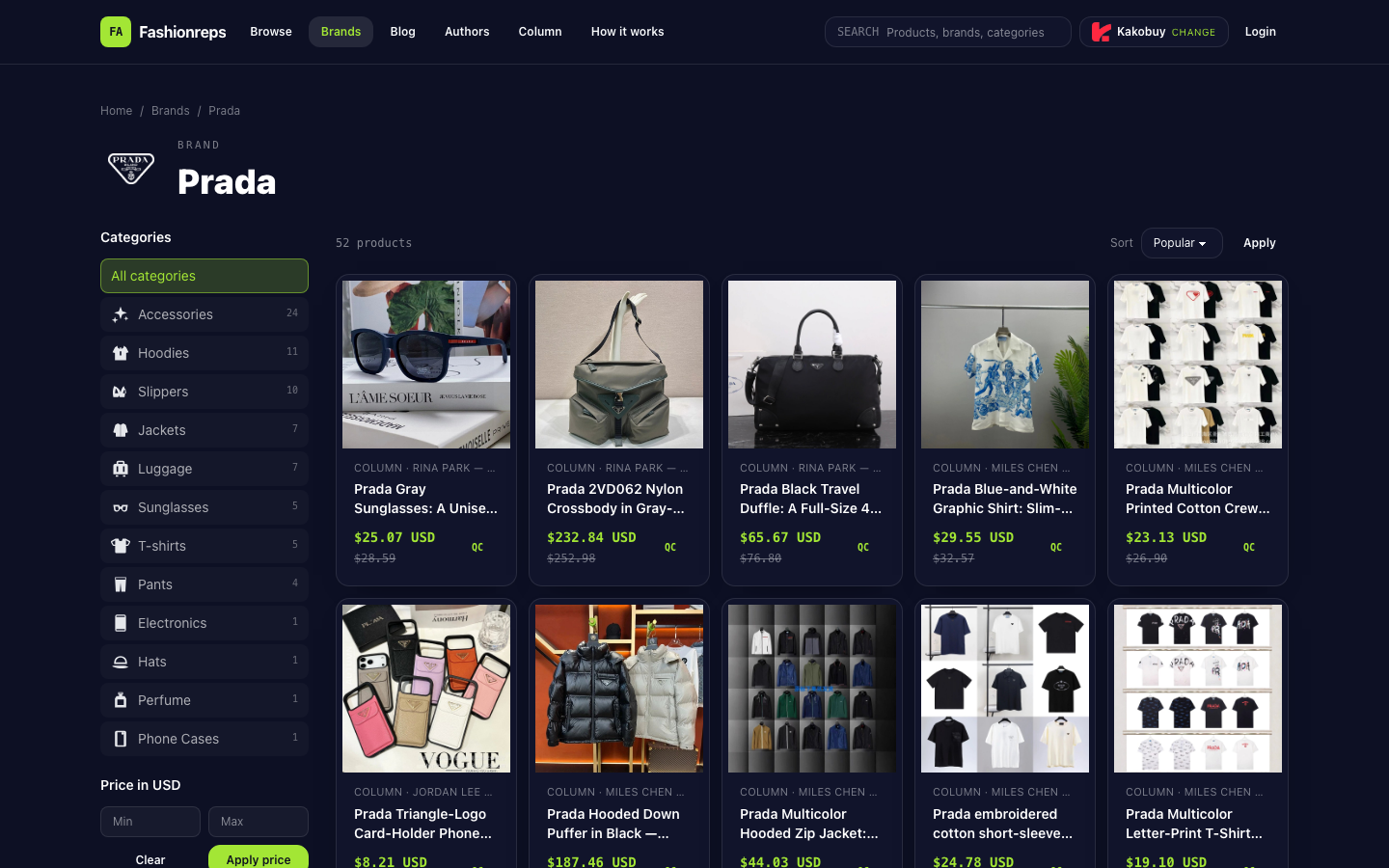
Open the Prada brand page on fashion-reps and first check the page title and brand filter status. The currently visible page shows 52 items under the Prada brand, with categories including Accessories, Hoodies, Slippers, Jackets, Luggage, Sunglasses, T-shirts, Pants, Electronics, Hats, Perfume, and Phone Cases.
Brand attribution on the product page only helps confirm that the product belongs to the Prada page; it does not mean the product automatically qualifies for a particular coupon. Discounts may be restricted by category, product status, shopping platform, or promotional conditions, so do not treat the brand filter results as proof of discount eligibility.
It is recommended to record the following information:
- Product name or model.
- Category.
- Reference price shown on the product page.
- Currently selected color, size, or specification, if the page has these options.
- Whether the product page shows any promotions, discounts, or other restriction text.
- Product link or page screenshot for later comparison with the shopping cart item by item.
2. The Discount Entry Must Correspond to the Purchase Platform
The fashion-reps page shows that the purchase button will enter the selected shopping platform; the page also provides entry points for multiple platforms. This means that discount conditions cannot be determined solely from fashion-reps' Prada brand page; you must also confirm the platform actually handling the order and the promotional rules currently displayed on that platform.
When verifying, follow this order:
- On the Prada product page, confirm the product name, price, and category.
- Check the currently selected shopping platform; do not assume all platforms use the same discount.
- Open the discount entry and record the discount name, applicable platform, validity period, minimum spend, and exclusions.
- Click the purchase button to enter the corresponding platform and confirm that the product has been correctly added to the shopping cart.
- If the page requires login, log in first, then check whether the discount can be claimed or selected.
- Return to the shopping cart to check whether the discount is automatically applied, or whether it needs to be manually selected.
If the discount text only appears on one platform, but the order actually goes to another platform, you cannot conclude that the Prada product meets the discount conditions. The current materials do not provide real-time coupon codes or promotional details for any specific platform, so discount amounts cannot be filled in here.
3. Check Item by Item Whether the Discount Applies to Prada Products
After the discount entry appears, do not only look at prompts like "available" or "claim successful". You should break down the discount conditions into several fields and check them item by item against the shopping cart contents.
| Verification Field | What to Confirm | Can the Prada Product Page Alone Prove It? |
|---|---|---|
| Applicable Scope | Whether limited to brand, category, product, or store | No, it can only confirm the product is displayed on the Prada brand page |
| Minimum Spend | Whether calculated on product subtotal, or order amount including fees | No, current materials do not provide discount rules |
| Validity Period | Claim time, usage deadline, and time zone | No, current materials do not provide coupon codes or dates |
| Exclusions | Whether sale items, specific categories, shipping, or service fees are excluded | No, need to check current discount description |
| Stacking Rules | Whether it can be combined with product discounts, platform promotions, or other coupons | No, need to verify in cart or checkout page |
| Currency and Amount | In which currency the discount is calculated, and whether the displayed amount is final | No, product page only shows reference price |
The current Prada page displays reference prices in US dollars. For example, the page shows Prada gray sunglasses, nylon bags, travel bags, and clothing, each with their own reference prices, but these prices are not the final amount due and cannot alone prove that a minimum spend for a discount is met. The product page also shows some items have previous reference prices, which also cannot replace the actual reduction fields on the checkout page.
4. Record Product Amount and Order Fees Separately
Before checkout, it is recommended to create a simple record and not mix product prices, platform service fees, packaging fees, international shipping, and currency conversion amounts. This way, you can determine which fee the discount actually reduces.
Record in the following order:
- Product subtotal: only the prices of Prada products in the shopping cart.
- Product-level discounts: if an individual product is discounted, record separately.
- Coupon reduction: only record the discount amount clearly shown on the checkout page.
- Platform service fees: record separately, do not assume the coupon can offset these.
- Packaging fees: if any, record separately.
- International shipping: do not estimate before obtaining an actual quote.
- Currency conversion: record the currency used on the checkout page and the conversion result.
- Final amount due: based on the amount shown on the last checkout page before submitting the order.
If the shopping cart only shows the coupon name without showing the reduction amount, you still cannot confirm that you have saved money. You need to continue viewing the order amount details to confirm whether the subtotal before discount, subtotal after discount, and final amount due have changed.
5. How to Confirm the Discount Is Actually Applied on the Checkout Page
After entering the checkout page before submitting the order, focus on the following evidence:
- Is the coupon or promotion name still displayed?
- Is the discount status applied, rather than just claimable or pending selection?
- Is the discount amount listed separately?
- Does the product subtotal match the shopping cart record?
- Are service fees, packaging fees, and international shipping included or excluded?
- Is the final amount due displayed in the current currency?
- After changing product quantity, specifications, or platform, is the discount still retained?
If the discount disappears after changing shopping platform, modifying product quantity, or adjusting order contents, the modified checkout page should prevail. Do not use the discount amount from a pre-modification screenshot to infer that the new order is still valid.
Before payment is completed, the checkout page amount may still change due to inventory, specifications, service fees, shipping, or exchange rate changes. The current materials do not provide real-time inventory, shipping, or final checkout amounts, so the savings amount for a Prada order cannot be provided here.
6. Situations That Cannot Be Judged as Discount Applicable
In the following situations, you should pause confirmation and not mark the order as having received a discount:
- Only the Prada brand page, without current discount rules.
- Only product reference prices, without before and after discount amount comparison.
- The discount entry does not state validity period or applicable platform.
- The discount shows as claimable, but the shopping cart has no reduction.
- The checkout page only shows the discount name, without showing the actual amount.
- The product belongs to a special category, but the discount rules do not state whether that category is included.
- The product subtotal meets the threshold, but it is unclear whether the threshold includes service fees, packaging fees, or shipping.
- After changing shopping platform, still using the original platform's discount judgment.
- The order total uses a different currency, and the conversion method is not stated.
Final Checklist
Before submitting the order, keep at least three sets of records:
- Prada product page: proves product name, category, and page reference price.
- Shopping cart: proves the products actually added to the order, quantities, and product subtotal.
- Checkout page: proves discount status, discount amount, other fees, and final amount due.
Only when the discount conditions correspond to the actual shopping platform, product scope, and order amount, and the checkout page clearly shows the reduction amount, can you confirm that this discount applies to the current Prada order. The existing materials do not provide verifiable current coupon codes or real-time discounts, so this article can only provide a verification process and cannot promise specific discounts or savings amounts.
Community feedback 0 reviews
No approved reviews yet.