How to Verify Dior Black Tee Print: Check 135 Black
- Published
- Revised
- Editors
- Marcus Hale · Editor-in-Chief
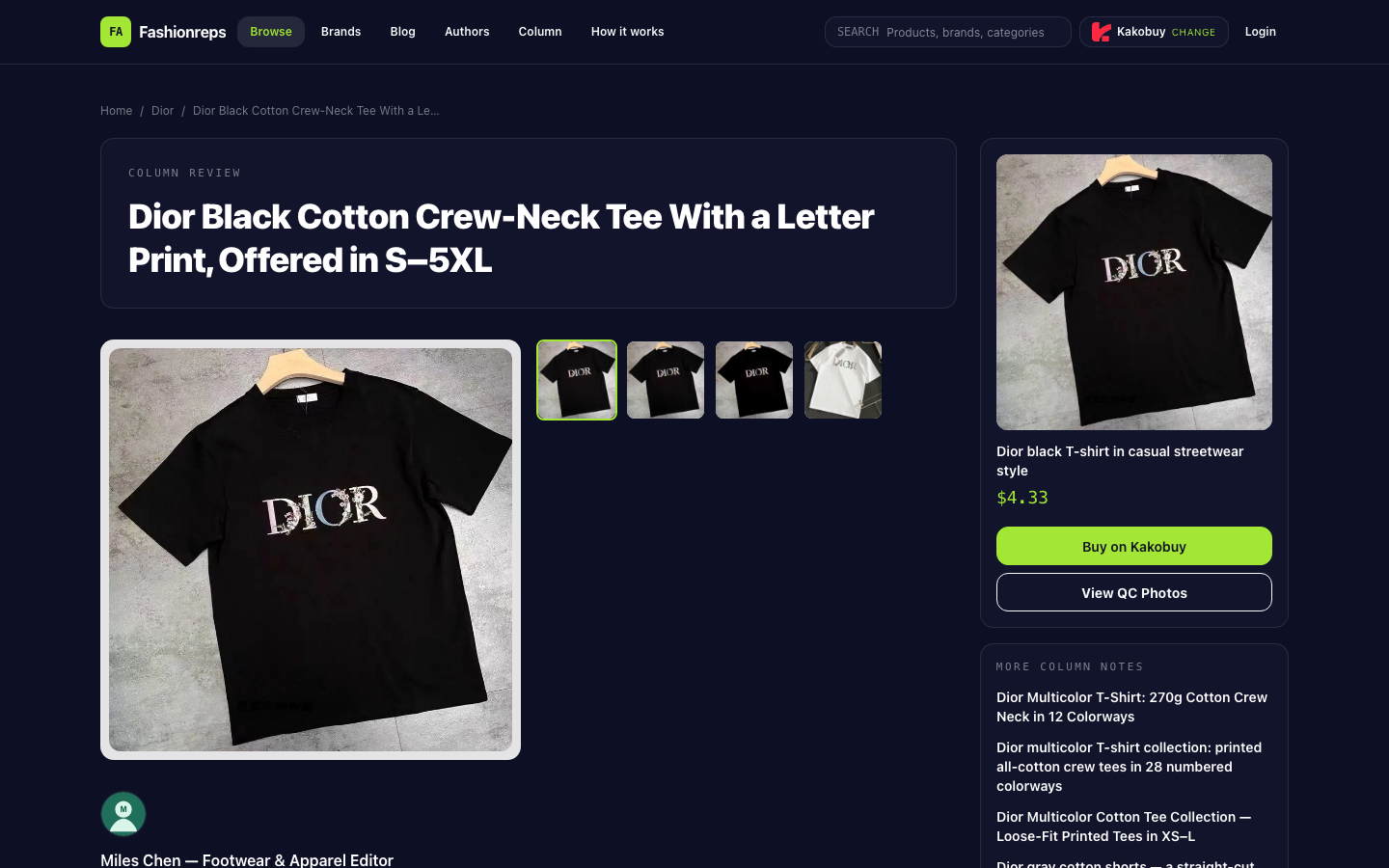
Clarify What to Verify First If a product page shows both black and white options with color fields like "135 black" and "135 white," you cannot determine whether QC photos belong to the same item based solely on color names. You need to match the color code, main product image, letter print placement, and clothing features in the QC photos item by item. The product page lists this short-sleeve crew-neck T-shirt in two color options: black and white, labeled "135 black" and "135 white" respec
Editor score 4.2 / 5
Clarify What to Verify First
If a product page shows both black and white options with color fields like "135 black" and "135 white," you cannot determine whether QC photos belong to the same item based solely on color names. You need to match the color code, main product image, letter print placement, and clothing features in the QC photos item by item.
The product page lists this short-sleeve crew-neck T-shirt in two color options: black and white, labeled "135 black" and "135 white" respectively; the description states it is pure cotton with a letter pattern and regular fit. Current evidence does not prove that the QC photos correspond to a specific color code, so independent verification should be completed before ordering.

Common Inconsistencies
Pay attention to the following situations:
- The color dropdown shows "135 black," but the clothing in the QC photos is clearly white or gray.
- The letter print in the main product image is on the chest, but the QC photos show it on the back, hem, or elsewhere.
- The main image shows the complete letter pattern, but the QC photos only show a partial pattern, making it impossible to confirm if it is the same design.
- The print color, letter spacing, or arrangement on the black garment differs significantly from the main product image.
- The QC photos only show generic pages or other size information without displaying the selected color, order style, or recognizable clothing details.
These observations only indicate discrepancies that require checking; they do not directly prove that the product is counterfeit, wrongly shipped, or of poor quality.
Verification Steps
1. Record the Color Field First
Write down the color name and code exactly as shown on the product page, e.g., "black" and "135 black." Do not treat "black" as the color code itself, and do not infer the code's meaning from page sorting.
Also note whether the page lists black and white as separate options and whether the main image changes when you select a color. If the image does not change when switching colors, the page itself does not provide sufficient visual evidence to confirm the color correspondence.
2. Compare Print Features in the Main Image
Check four features of the letter print:
- Location: chest, back, or other area.
- Orientation: horizontal, vertical, or multi-line.
- Number of letters, spacing, and approximate proportions.
- Color contrast between the print and garment, and whether edges are clearly discernible.
Do not rely solely on "there is a letter print" to judge consistency, because different styles from the same brand or page may also use letter patterns.
3. Review the QC Photos
QC photos should at least confirm the garment color, print location, and overall silhouette. Prioritize front, back, and close-up print photos; if the photos only show folded state or partial areas, mark the conclusion as "cannot confirm" rather than adding speculation.
You can record items one by one using the table below:
| Check Item | Confirmable Evidence | Action When Cannot Confirm |
|---|---|---|
| Color | Garment color in image matches selected field | Pause order and request additional color-specific photos |
| Print Location | Main image and QC photo show same location | Request full front or back image |
| Pattern Details | Letter arrangement, spacing, and outline essentially match | Do not treat partial similarity as proof of same style |
| Silhouette | Crew neck, short sleeves, and overall fit match | Wait for more complete QC photos |
| Order Correspondence | QC page shows selected color or order info | Confirm with shopping agent that images belong to order |
How to Distinguish Observable Facts from Authenticity Judgment
Through product and QC images, you can usually only verify color, pattern location, garment outline, and whether the images belong to the same order. Even if these items match, you cannot prove authenticity, fabric composition, or actual wearing performance solely from images.
The page claims this product is pure cotton, with a weight range of 180–250 g/m², and offers sizes S to 5XL; these are product page descriptions and do not mean that the QC photos have proven fabric composition or weight. Existing public reviews discuss other Dior T-shirts and cannot be directly used as physical conclusions for this product.
When to Stop
If any of the following occurs, do not proceed with payment, exchange judgment, or use the images as evidence for this product:
- Color code cannot be matched to image color.
- After selecting "135 black," you still cannot confirm whether the images belong to the black version.
- Print location or pattern arrangement clearly inconsistent with the main image.
- Too few QC photos to see both color and print.
- Page only provides generic images without order, color, or size correspondence.
- Need to judge authenticity, fabric composition, or durability from images but lack independent testing evidence.
Stopping does not mean confirming a problem with the product; it only means current evidence is insufficient to support the next decision.
Official Help Channels and What to Ask
The product page provides a shopping agent entry. You should submit the product link, order number, selected color field, and existing QC photos to the currently selected shopping agent or their order customer service, and ask them to confirm:
- Whether the order indeed selected "135 black."
- Whether the QC photos come from this order and this color.
- Whether they can provide additional front, back, and print close-up photos.
- If color or print does not match, whether it is possible to request exchange or cancellation before shipment.
When asking, do not just say "please confirm if it is black"; also point out the color code and print location, so it is easier to get a verifiable reply. After receiving supplementary photos, re-compare by color, location, pattern, and order attribution.
Article Image
Community feedback 0 reviews
No approved reviews yet.