Carhartt Pants: Spreadsheet vs Google Sheets Filtering
- Published
- Revised
- Editors
- Marcus Hale · Editor-in-Chief
What This Filtering Guide Helps You Decide If you're trying to find Carhartt pants on Fashionreps that lean more toward actual workwear use, the real question isn't "which pair looks best"—it's whether candidates simultaneously meet your requirements for pocket layout, fit, size documentation, and photo evidence. This guide is for anyone who needs to keep multiple candidates, compare them repeatedly, and eventually hand them off to a shopping agent t
Editor score 4.2 / 5
What This Filtering Guide Helps You Decide
If you're trying to find Carhartt pants on Fashionreps that lean more toward actual workwear use, the real question isn't "which pair looks best"—it's whether candidates simultaneously meet your requirements for pocket layout, fit, size documentation, and photo evidence. This guide is for anyone who needs to keep multiple candidates, compare them repeatedly, and eventually hand them off to a shopping agent to order. If you just want to quickly check one item, browsing the site's catalog directly is faster.
Verification date: October 13, 2026. This article is based only on the currently visible Fashionreps pages—the catalog, product cards, QC galleries, and shopping agent entry instructions. It does not treat unshown inventory, prices, fabric composition, or actual fit as confirmed facts. 🙂
After reading, you should be able to do three things: first, locate candidates on the site; second, organize pocket, fit, and size information into Google Sheets; and third, decide whether to keep, re-check, or drop each candidate based on evidence completeness.

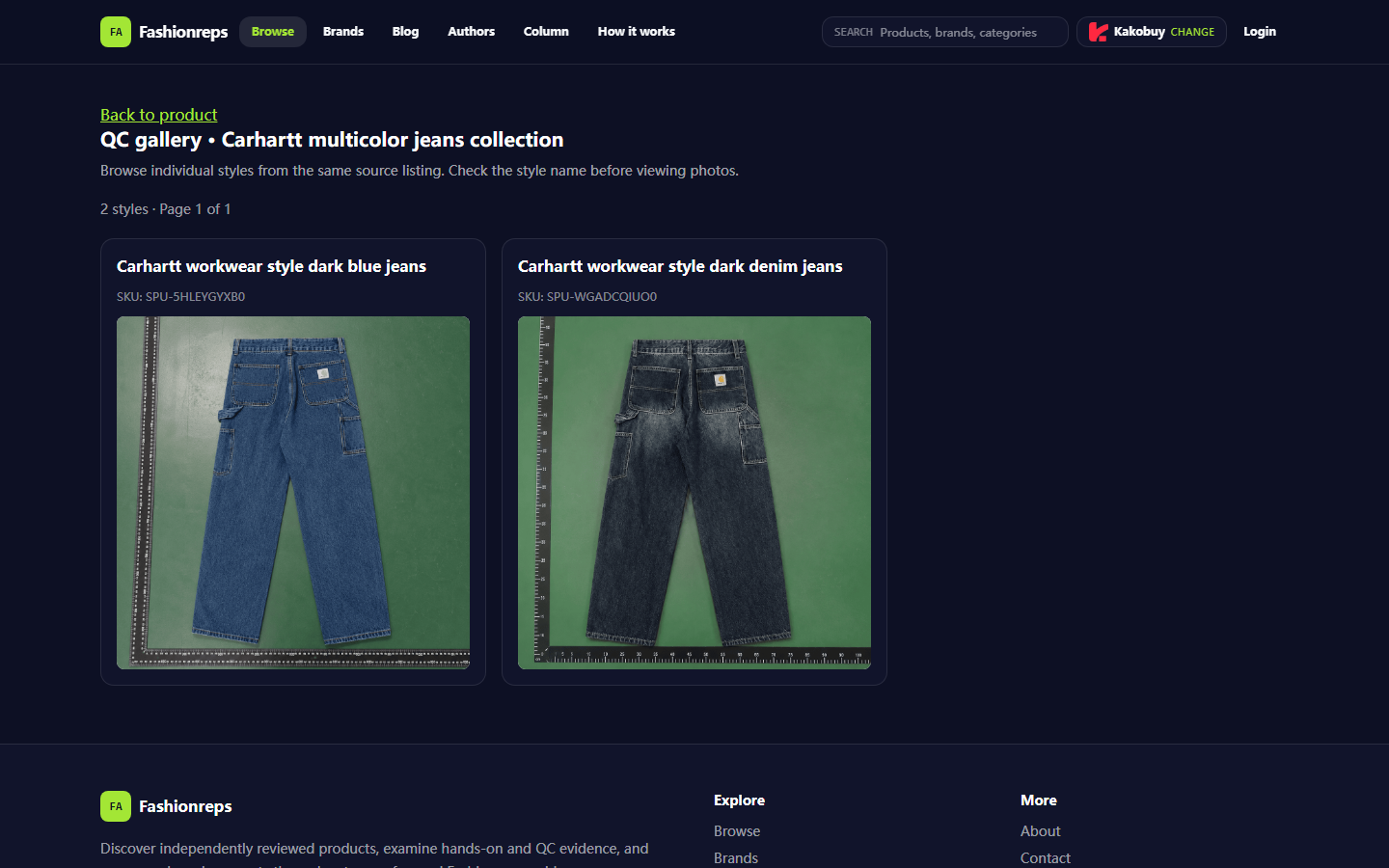
Image: Sample Fashionreps Carhartt product and QC pages. The image illustrates the relationship between product cards and QC galleries on the site; it does not mean every product has the same number or angles of photos.
Verify Fashionreps Site Spreadsheet Categories and Product Cards
Fashionreps' visible structure is closer to a product catalog than a pre-standardized purchasing spreadsheet. The page offers brand browsing, product categories, product cards, and separate QC galleries; product details show the product name and SKU, and some pages list different styles from the same source separately. For example, the QC page for Carhartt's multi-color denim series shows two independent styles with separate style names and SKUs. This information is good for building a candidate list, but you still need to break down pocket and fit fields yourself.
The site catalog is good for discovering products: first browse by Carhartt or relevant pants categories, then open product cards to confirm names, styles, and images. Don't judge the number of pockets based only on words like "workwear," "cargo," or "jeans" in the title—titles may only describe the style and not fully explain the front, back, side, or tool pocket structure.
The Buy button on a product page leads to the selected shopping agent's process. The page also shows that you can choose different shopping agents; orders, payments, and shipping are handled by the agent's site. So Fashionreps pages can handle discovery, comparison, and QC evidence viewing, but they cannot replace the agent's final confirmation of price, stock, available sizes, and shipping costs. 🔎
Use Google Sheets to Track Pocket, Fit, and Size Fields
The value of Google Sheets is organizing scattered text, images, and links from the site into a filterable structure. Use one row per style—don't combine two pants from the same source into one cell. At minimum, create these fields:
- Product Name: Keep the original name shown on the site for easy re-checking.
- SKU: Use the SKU from the product card or QC page; don't rewrite it.
- Pocket Layout: Record front, back, side, and tool pockets separately; use "Yes," "No," or "Unconfirmed."
- Fit: Straight, relaxed, tapered, jeans, or unconfirmed. Only fill in a specific type if the page clearly states it or images support it.
- Waist and Hem: Record visible details like elastic, button, drawstring, or cuffed hem; leave unknown items blank or mark unconfirmed.
- Size Evidence: Distinguish "has size chart," "has measurement photos," "only size tag," or "not provided."
- Image Evidence: Record product images, detail shots, QC photos, or none.
- Page Status: Accessible, needs re-check, redirected, or cannot confirm.
- Verification Date: Update the date after each re-check.
- Notes: Only write differences that affect decisions, like "side pocket angle obscured" or "fit inferred from title only."
You can split pocket fields into multiple filter columns or keep one "Pocket Layout" overview column. The former is better for strict filtering; the latter for quick reading. If you'll compare more than ten candidates, use multiple separate columns to avoid mixing different types of information like "has side pockets, possibly relaxed, images incomplete" in one long text.
How Site Category Browsing and Spreadsheet Filtering Work Together
The division of labor should be clear: the site handles discovery and reviewing original evidence, Google Sheets handles unifying fields and excluding candidates that don't meet criteria.
Recommended order:
- On Fashionreps, first locate Carhartt pants-related categories or brand pages.
- Open product cards and record product name, SKU, visible style information, and page status.
- Check product images and QC galleries, separately judging whether pockets are visible and whether the leg shows a straight or relaxed silhouette.
- Fill in clearly visible fields in Google Sheets; mark unconfirmable fields as "Unconfirmed"—don't fill gaps with guesses.
- Use filters to keep target combinations, like "Side pocket = Yes," "Fit = Relaxed or Straight," "Size evidence ≠ Not provided."
- For filtered candidates, reopen the original page to check if records still match.
- Before entering the shopping agent, re-check the agent's displayed price, stock, sizes, and purchase restrictions.
Spreadsheet filtering is not evidence itself. It only recombines already recorded information. If a pair of pants has no side-view image, you cannot fill in "Side pocket = Yes" just because it's in the "workwear pants" category. This step is key to avoiding mistaking style labels for specifications. ✅
How to Save Image Evidence and Text Specifications Separately
Text specifications and image evidence should be saved separately. Text fields answer "what does the page explicitly say," image fields answer "what do the images actually show." For example, a product title might include "workwear," but images only show the front; then you can record the style label as page text and mark side pockets as "Unconfirmed."
Use three evidence levels in your sheet:
- Confirmed: Page text or clear images directly support the field.
- Partially visible: Only part can be seen, full structure not confirmable.
- Unconfirmed: Not enough text or images to support judgment.
QC images only indicate that the page provides some inspection photos; they don't automatically prove quality, size accuracy, or fabric feel. Page samples show that QC galleries may list multiple independent styles under one source, so when viewing images, first confirm the style name and SKU, then assign evidence to the correct row. Don't mix images from another style under the same source into your target style.
If saving image evidence, record the image's page and screenshot date; don't put personal order numbers, addresses, phone numbers, or payment info in the sheet. For sheets shared with collaborators, also check for any agent order or account information. 🔐
How to Re-check Links, Sources, and Update Times for Multiple Candidates
The system processes page links after saving, so you don't need to manually create article links in the sheet. Your own research sheet should still keep source fields, at least including product name, SKU, source page type, verification date, and re-check result.
On each re-check, do four checks:
- Does the page still open, or is it redirected to a blank page or another style?
- Do the product name and SKU still match your sheet?
- Do images still support pocket and fit judgments?
- Is the shopping agent entry still showing as a selectable agent process?
Prices, stock, available sizes, agent fees, and shipping conditions can change. The currently visible catalog information on Fashionreps cannot replace real-time confirmation from the agent, so mark these fields as "Needs re-check before ordering" rather than permanently writing them as conclusions. 📅
Which Tasks Suit the Site Catalog vs. Your Own Spreadsheet
The site catalog suits these tasks: quickly discovering Carhartt-related products, browsing by brand or category, opening product cards, viewing style names and SKUs, checking QC galleries, and entering the shopping agent selection process.
Google Sheets is better for: comparing multiple candidates at once, filtering by pocket fields, distinguishing fit records like straight vs. relaxed, tracking size evidence, marking page status, assigning re-check tasks to collaborators, and saving multiple verification dates.
If you have only one or two candidates, using the site pages and checking each one is enough. If you have five or more candidates, especially when you need to filter side pockets, back pockets, fit, and size evidence simultaneously, building a sheet is more reliable. Don't copy fields without evidence just to "make it a spreadsheet"; blank or "Unconfirmed" is more useful than a fake complete record.
Field Checklist Before Keeping Final Candidates
Before submitting to a shopping agent, check against these minimum standards:
- Product name and SKU recorded, and you can return to the corresponding page.
- Pocket layout has at least front, back, and side pocket judgments; unclear items marked unconfirmed.
- Fit judgment has page text or image basis; brand impression is not used as fit evidence.
- Size chart, measurement photo, or size tag evidence types are distinguished.
- QC images correspond to the correct style; no mixing with other styles from the same source.
- Page access status and latest verification date filled in.
- Price, stock, available sizes, shipping, and agent conditions not mistakenly written as fixed facts.
- Personal orders, addresses, payment info, and complete shipping labels not in the shared sheet.
The final keep standard should be "fields sufficiently support the next decision," not "every cell filled." If pocket layout is critical but the page lacks side or back pocket images, keep it as a candidate for re-check; if both fit and size evidence are insufficient, it's not advisable to order directly. This way, the site catalog provides original clues, Google Sheets makes the comparison process trackable, and the shopping agent handles real-time confirmation before ordering.
Community feedback 5 reviews
Reader score 4 / 5 (5 ratings)
- soapbox_sam4 / 5
Handing candidates to a shopping agent is the step people skip. The agent sees what you paste them, so if your notes are vague you get the wrong pair, simple as that. Good reminder to keep the requirements written down in one place.
- Hanna_R3 / 5
Solid framework, though I expected a couple of worked examples with actual rows filled in. The part about photo evidence is the bit I'll keep. Rest felt a little abstract for someone who just wants durable pants for warehouse shifts.
- crowbar_kid4 / 5
could use a cleaner comparison between the relaxed fit and the loose ones. the spreadsheeting stuff is good but I want a straight answer on which cut actually sits lower on the hip. photo evidence angle is right though, real pics beat the official studio shots every time
- DevonPierce5 / 5
Finally someone says out loud that size documentation matters more than the thumbnail. I got burned once ordering a pair where the waist was listed in cm and the inseam in inches. Keeping multiple candidates in a sheet and comparing photos before handing off to my agent is exactly what I do now.
- Marla_TruckerFit4 / 5
Been wearing the same Carhartt pants for years and never thought about filtering candidates this way. The pocket layout point is huge for me, side pockets on the wrong cut ruin a whole pair. Appreciate that the guide treats it like a workwear decision and not a fashion shoot.